
E-walk - Offline maps1.0.43 - Google Play
You'll be able to see results in few seconds.
Publisher Description


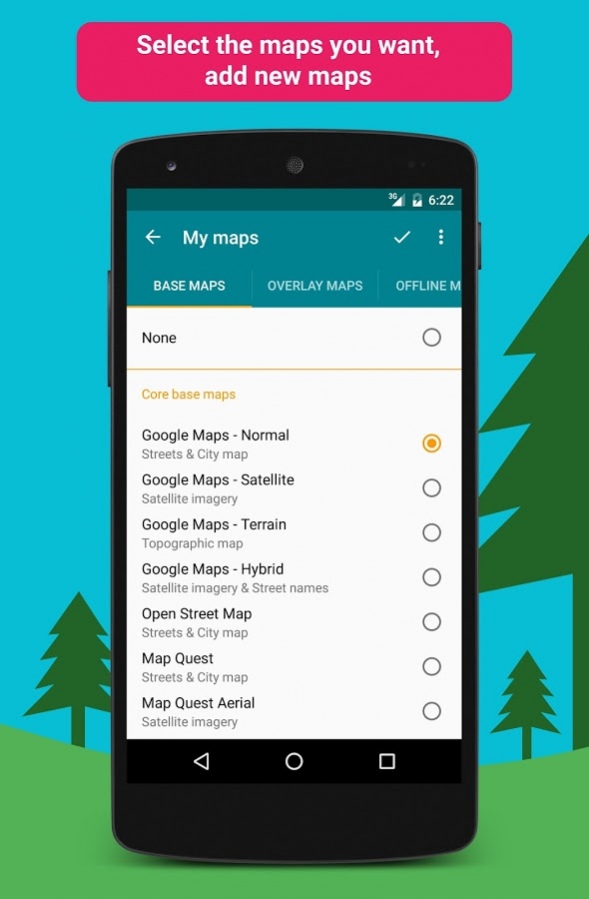


E-walk allows you to download offline maps, to plan your treks, to show and share your position, to record your treks, etc... This makes E-walk the perfect companion for outdoors activities (such as trekking, hiking, fishing, hunting, etc...) and for traveling abroad, because you can fully use it offline.
Lost in a forest? E-walk brings you back to your car. Forgot about where was this lovely boutique you noticed last year in Venice? E-walk refreshes your memory!
E-WALK KEY FEATURES
• download maps for later offline use
• show your current location on the map
• search places (last searches are saved for offline use)
• record your treks
• select different base maps (streets, satellite, terrain, etc...)
• plan your treks by creating and editing KML files on the map. A KML file can contains markers, lines & polygons
E-WALK ADVANCED FEATURES
• organize your treks in folders & subfolders
• display overlay maps (weather, roads, metro/bus, ski slopes, sea map, etc...)
• share your position via e-mail or SMS
• open a position in your other geo apps (such as Google Maps, Waze, TomTom, Sygic, Mappy, Locus, Orux, MyTrails, etc...)
• share a trek by e-mail, bluetooth, etc... Either in KML file format (by default) or in GPX file format
• import GPX files (they will be converted in KMZ format)
• add custom maps in the XYZ protocol (see
http://wiki.openstreetmap.org/wiki/Slippy_map_tilenames
)
• add custom maps in the WMS protocol (version 1.1.1 & 1.3.0 are supported, Web Mercator coordinate system only. See
https://en.wikipedia.org/wiki/Web_Map_Service
)
E-WALK FREE
Don't want to pay? Get
E-walk Free
!
E-WALK PLUGINS
Some plugins are available for E-walk (a plugin is an app that adds features to another app). You can download them here:
•
IGN maps
: this plugin adds maps provided by the french national institute of geographical and forestry information (
http://www.ign.fr
). These maps are the same as the ones used by the Géoportail website (
http://www.geoportail.gouv.fr
). The plugin also allows you to use the IGN Leisure Space (
http://espaceloisirs.ign.fr
). It is a website providing points of interest and treks that you can synchronize on your device.
•
ONCFS maps
: this plugin adds maps provided by the french national office for wildlife and hunting (
http://www.oncfs.gouv.fr
)
CONTACT
A problem with E-walk? A suggestion? A feedback? Please do not hesitate to send an e-mail to
contact.ewalk@gmail.com
!
About E-walk - Offline maps
The company that develops E-walk - Offline maps is Tim Autin. The latest version released by its developer is 1.0.43.
To install E-walk - Offline maps on your Android device, just click the green Continue To App button above to start the installation process. The app is listed on our website since 2017-12-03 and was downloaded 0 times. We have already checked if the download link is safe, however for your own protection we recommend that you scan the downloaded app with your antivirus. Your antivirus may detect the E-walk - Offline maps as malware if the download link to com.at.ewalk.pro is broken.
How to install E-walk - Offline maps on your Android device:
- Click on the Continue To App button on our website. This will redirect you to Google Play.
- Once the E-walk - Offline maps is shown in the Google Play listing of your Android device, you can start its download and installation. Tap on the Install button located below the search bar and to the right of the app icon.
- A pop-up window with the permissions required by E-walk - Offline maps will be shown. Click on Accept to continue the process.
- E-walk - Offline maps will be downloaded onto your device, displaying a progress. Once the download completes, the installation will start and you'll get a notification after the installation is finished.
Program Details
System requirements
Download information
Pricing
Version History
version 1.0.43
posted on 2017-12-03
This update fixes a translation error and adds an "Organize" option in the overflow menu of the "My treks" screen.
version 1.0.31
posted on 2016-12-21
As requested by Google, this update puts back the Google logo whatever the displayed map. It also fixes some minor bugs.
version 1.0.19
posted on 2016-09-04
Disclaimer
Official Google Play Link
We do not host E-walk - Offline maps on our servers. We did not scan it for viruses, adware, spyware or other type of malware. This app is hosted by Google and passed their terms and conditions to be listed there. We recommend caution when installing it.
The Google Play link for E-walk - Offline maps is provided to you by apps112.com without any warranties, representations or guarantees of any kind, so access it at your own risk.
If you have questions regarding this particular app contact the publisher directly. For questions about the functionalities of apps112.com contact us.
